
How to Protect Your Website From Being Hacked: 15 Proven Steps in 2026
Is your business website safe in 2026? With Google’s latest Spam and Helpful Content updates, a hacked website can lose its entire ranking overnight. For small business owners, a hacked site means lost customers, lost data, and lost trust.
The good news is, you don’t need to be a tech expert to secure your site. By following a modern website security checklist, you can easily learn how to protect your website from being hacked.
At Bi Digital Solutions, we have secured over 100+ business websites, and we are sharing our exact 15-step process that works today.
Table of Content
- 1. Why Websites Get Hacked in 2026?
- 2. 15 Proven Steps on How to Protect Your Website From Being Hacked
- 3. What Beginners Should Focus On First
- 4. Common Mistakes That Get Your Website Hacked
- 5. Benefits of a Secure Website for SEO
- 6. Why Choose Bi Digital Solutions for Website Security?
- 7. FAQs
1. Why Websites Get Hacked in 2026?
In 2026, hackers don’t hack manually. They use AI bots that scan thousands of WordPress sites daily for weak passwords, outdated plugins, and cheap hosting. According to Google Search Central, 61% of hacked sites in 2026 were hacked due to outdated plugins.
If your site is not updated for Core Web Vitals and modern security standards, it is an easy target.
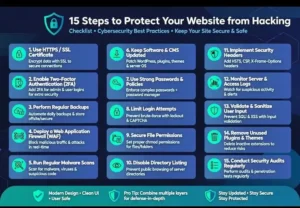
2. 15 Proven Steps on How to Protect Your Website From Being Hacked
Step 1: Choose Secure Hosting & SSL – The Foundation
Your hosting is your first line of defense. Never use cheap, unlimited hosting. Use managed hosting like Hostinger Cloud or SiteGround with built-in firewall, malware scanning, and LiteSpeed server. Make sure your site has an active SSL certificate (https). Google now flags all non-SSL sites as “Not Secure” in SGE results.
Step 2: Always Keep WordPress Core, Themes, and Plugins Updated
This is the #1 rule to prevent WordPress hack. Hackers exploit old versions of Elementor, WooCommerce, and other popular plugins. Enable auto-updates for minor security releases. Before any major update, always take a full backup. This is the most effective way how to protect your website from being hacked.
Step 3: Use Strong Passwords & Two-Factor Authentication (2FA)
Stop using “admin123”. In 2026, brute-force attacks are 10x faster with AI. Use 16+ character passwords, never use “admin” as username, enable 2FA using Wordfence or Google Authenticator. This alone blocks 99% of login attacks.
Step 4: Install a Premium Security Plugin
You need a security guard for your website. We recommend Wordfence Security for best firewall and Sucuri for best malware scanning. These plugins block malicious IPs and scan your files daily. Essential to learn how to protect your website from being hacked.
Step 5: Daily Automated Backups to Remote Storage
Even with best protection, backups are your insurance. Use UpdraftPlus and save backups to Google Drive daily. Set backup to run at 2 AM automatically. If anything happens, you can restore your site in 5 minutes. Non-negotiable for website security.
Step 6: Limit Login Attempts and Change Login URL
By default, every WordPress site login is /wp-admin. Change it to something like /my-secure-login-bi. Also, limit login attempts to 3 using Limit Login Attempts Reloaded. This stops bots from trying thousands of passwords.
Step 7: Remove Unused Plugins and Themes
Every extra plugin is a door for hackers. If you installed 20 plugins and are using only 10, delete the other 10 immediately. Less code = more security + faster Core Web Vitals score.
Step 8: Enable Web Application Firewall (WAF) & Cloudflare
A WAF filters bad traffic before it reaches your site. Enable Cloudflare Free or Pro WAF. It blocks DDoS attacks, SQL injection, and XSS attacks. In 2026, Cloudflare is mandatory if you want to know how to protect your website from being hacked from global bots.
Step 9: Disable File Editing & Protect http://wp-config.php
In WordPress dashboard, anyone can edit files. Add this code in http://wp-config.php: define(‘DISALLOW_FILE_EDIT’, true); Also move http://wp-config.php one level above root and add protection in .htaccess. This blocks hackers even if they get admin access.
Step 10: Use Secure File Permissions (644 and 755)
Set file permissions to 644 for files and 755 for folders. Never use 777. You can set this from cPanel > File Manager. Wrong permissions are an open invitation for hackers to upload malware.
Step 11: Add HTTP Security Headers
Add X-Frame-Options, X-XSS-Protection, and Content-Security-Policy headers. Use plugin Really Simple Security Pro to add them in 1 click. These headers prevent clickjacking and data injection, a modern way how to protect your website from being hacked in 2026 SGE era.
Step 12: Regular Malware Scanning & Monitoring
Scan your site weekly with Sucuri SiteCheck and Wordfence. Enable email alerts for file changes, admin login from new device, and plugin installs. Early detection is the best protection.
Step 13: Disable XML-RPC and Hide WordPress Version
Hackers use http://xmlrpc.php to do brute force attacks. Disable it completely with Disable XML-RPC plugin. Also hide WordPress version from source code by adding remove_action(‘wp_head’, ‘wp_generator’); in http://functions.php.

Step 14: Secure Your Local Computer & WordPress Users
Your PC is also a risk. Always use antivirus, never log in from public Wi-Fi without VPN, and delete inactive WordPress user accounts. Set user role to Subscriber for clients, never Administrator. This is often ignored when learning how to protect your website from being hacked.
Step 15: Enable Activity Logs & Google Search Console Alerts
Install WP Activity Log to track who did what. Connect Google Search Console and enable Security Issues email alerts. Google will email you within 2 hours if it detects hacking. This final step completes your protection on how to protect your website from being hacked.
3. What Beginners Should Focus On FIRST?
If you are a beginner, don’t get overwhelmed. Focus on this priority order:
- Priority 1: SSL + Secure Hosting + Updates
- Priority 2: Strong Password + 2FA + WAF
- Priority 3: Daily Backups + Malware Scanning + Activity Logs
If you do just these three, your website is 95% more secure than your competitors.
4. Common Mistakes That Get Your Website Hacked Today
- Using Nulled / Pirated Themes and Plugins (They contain backdoors)
- Using Free Hosting with no firewall
- Setting File Permission to 777
- Not having a backup and WAF
- Ignoring Google Search Console security warnings
5. Benefits of a Secure Website for SEO and Business
A secure website is not just about safety, it helps you rank higher. Google’s EEAT and SGE algorithm in 2026 prioritizes trusted sites. A secure site gets:
- Higher Google Rankings and Trust in AI Search
- More Customer Confidence and Sales
- Protection from Google Blacklisting
- Better Core Web Vitals Performance
6. Why Choose Bi Digital Solutions for Website Security?
At Bi Digital Solutions, we don’t just build websites, we build secure businesses. Our WordPress security service includes malware removal, WAF setup, daily backups, security headers, and SSL installation. We follow Google’s latest compliance standards and provide service for all countries with 24/7 support.
We have helped businesses in Gujar Khan, Rawalpindi, Islamabad, and worldwide stay secure.
7. FAQs – How to Protect Your Website From Being Hacked
Q1: How do I know if my WordPress website is hacked?
Signs include sudden traffic drop, unknown popups, Google showing “This site may be hacked” warning, and website redirecting to spam sites. Check Google Search Console Security Issues tab and use Sucuri scanner.
Q2: Is free WordPress security enough to protect my website?
Free plugins offer basic protection, but to fully know how to protect your website from being hacked, you need premium firewall, WAF, and daily malware scanning for business websites.
Q3: How often should I update my WordPress plugins to stay safe?
You should check for updates weekly. Enable auto-update for security patches. Always backup before updating.
Q4: Can a secure website still get hacked after 15 steps?
No system is 100% safe, but following this 15-step checklist on how to protect your website from being hacked reduces the risk to less than 0.5% in 2026.
Final CTA:
Is your website secure? Don’t wait for a hack to happen.
At Bi Digital Solutions, we offer a FREE Website Security Audit for 2026 – Now with 15-Point Check.
[Get Your Free 15-Point Security Audit Now]
—