
How to Restore a Locked Amazon Account in 2026: Complete Recovery Guide
Losing access to your Amazon account can be frustrating, especially when you use it for shopping, managing orders, tracking deliveries, or accessing important account information.

An Amazon account may become locked for different reasons, including security concerns, unusual activity, incorrect login attempts, or verification issues.
The good news is that most locked Amazon accounts can be recovered by following the correct steps. In this guide, we will explain how to restore a locked Amazon account in 2026, why accounts get locked, and what you can do to regain access safely complete guidence at bidigital solution.
Why Is My Amazon Account Locked?
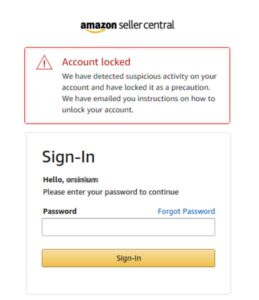
Amazon uses advanced security systems to protect customer accounts from unauthorized access. If Amazon detects unusual activity, it may temporarily lock an account to protect personal and payment information.
Some common reasons why an Amazon account may be locked include:
1. Too Many Incorrect Login Attempts
Entering the wrong password multiple times can trigger a security lock. This is one of the most common reasons users temporarily lose access to their accounts.
2. Suspicious Login Activity
Amazon may lock an account if it detects unusual sign-in attempts, such as:
- Login from an unfamiliar location
- Multiple devices accessing the account
- Unexpected password changes
- Suspicious account activity
3. Payment or Billing Problems
Issues with payment methods can sometimes cause account restrictions. Examples include:
- Failed payments
- Expired cards
- Unusual payment activity
- Billing information problems
4. Account Information Issues
Amazon may request additional verification if there are concerns about your account details, such as changes to your email address, phone number, or payment information.
5. Violation of Amazon Policies
In some cases, accounts may be restricted due to activities that violate Amazon’s terms and conditions.
How to Restore a Locked Amazon Account
Follow these steps to recover your Amazon account safely.
Step 1: Try Logging Into Your Amazon Account
Start by visiting the official Amazon website and attempting to sign in.
Make sure:
- Make sure you are entering the correct email address or phone number linked to your Amazon account.
- Your password is entered correctly
- Your internet connection is working properly
If you cannot remember your password, use the password recovery option.
Step 2: Reset Your Amazon Password
If your account is locked because of incorrect login attempts, resetting your password may help restore access.
To reset your password:
- Go to the Amazon sign-in page.
- Select the “Forgot Password” option.
- Enter your registered email address or phone number.
- Follow the verification instructions.
- Create a new secure password.
Choose a strong password that includes a combination of letters, numbers, and symbols.
Step 3: Complete Amazon Account Verification
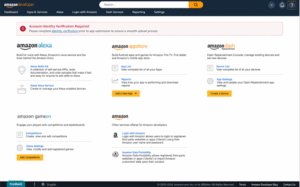
Complete the requested steps carefully and make sure all information matches your Amazon account details.
Step 4: Check Your Email for Amazon Messages
When Amazon locks an account, it may send an email explaining the reason and providing recovery instructions.
Check:
- Your Amazon registered email inbox
- Spam or junk folders
- Promotional folders
Only follow instructions from official Amazon communication. Avoid clicking suspicious links claiming to unlock your account.
Step 5: Contact Amazon account Customer Support
If you cannot restore your account through automatic recovery, contacting Amazon customer support is the next step.
When contacting support:
- Explain that your account is locked
- Provide accurate account details
- Follow the verification process
- Clearly explain the issue you are facing with your Amazon account.
Amazon customer support can guide you through the required recovery steps.
How Long Does Amazon Account Recovery Take?
The time required to unlock an Amazon account depends on the reason it was locked.
Some accounts may be restored within a short time after verification, while others may require additional review.
Factors that affect recovery time include:
- Reason for account locking
- Verification requirements
- Response time from Amazon support
- Accuracy of submitted information
Providing correct information can help avoid unnecessary delays.
How to Prevent Your Amazon Account From Being Locked Again
After recovering your account, take steps to improve security and prevent future problems.
Use a Strong Password
Create a unique password that you do not use on other websites.
A strong password should include:
- Uppercase letters
- Lowercase letters
- Numbers
- Special characters
Enable Two-Step Verification
Two-step verification adds an extra layer of security by requiring an additional code when signing in.
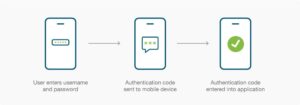
This helps protect your account even if someone discovers your password.
Keep Your Account Information Updated
Make sure your:
- Email address
- Phone number
- Payment information
are current and accurate.
Avoid Suspicious Links
Never enter your Amazon login information on unknown websites. Scammers often create fake pages to steal account details.
Always use Amazon’s official website or mobile app to access your account.
Monitor Your Account Activity
Regularly check your orders, payments, and account settings. If you notice anything unusual, take action immediately.
What If Amazon Does Not Unlock My amazon Account?
If your Amazon account remains locked after following recovery steps:
- Review Amazon’s emails carefully
- Complete any additional verification requests
- Contact Amazon support again
- Provide accurate ownership information
Avoid using unofficial account recovery services that claim they can unlock your account for a fee. These services may put your personal information at risk.
Conclusion
A locked Amazon account can be stressful, but in most cases, it can be restored by following the correct recovery process. Start by checking your login details, resetting your password, completing verification, and contacting Amazon support if needed.
The best way to protect your account in the future is to use strong security practices, enable two-step verification, and monitor your account activity regularly.
By following this guide, you can improve your chances of successfully restoring your locked Amazon account and getting back to using Amazon services safely.
for more information visit our website bidigital solution
